
ChatGPT has become one of the most accessible artificial intelligence tools for everyday tasks. Whether you want help writing emails, understanding difficult topics, planning projects, or learning new skills, ChatGPT can be a useful digital assistant.
However, if you have never used an AI chatbot before, knowing where to begin can feel confusing.
In this guide, you will learn how to use ChatGPT for beginners, including how to get started, write effective prompts, explore practical examples, avoid common mistakes, and use AI more responsibly.
You do not need programming knowledge or advanced technical skills to begin.
Table of Contents
What Is ChatGPT?
ChatGPT is an AI assistant developed by OpenAI. It allows users to interact with artificial intelligence through natural-language conversations.
Instead of searching for information using only short keywords, you can ask questions, provide instructions, request explanations, and refine the results through follow-up messages.
For example, you could ask ChatGPT to:
- Explain a complicated concept in simple English.
- Draft a professional email.
- Generate ideas for a blog article.
- Help organize a study schedule.
- Summarize text you provide.
- Suggest ways to improve your writing.
- Help you understand programming concepts.
- Brainstorm content for a YouTube channel.
ChatGPT can be helpful, but its answers are not always accurate. Important facts should be checked against reliable sources.
Want to know how ChatGPT compares with Google’s AI assistant? Read our ChatGPT vs Google Gemini: Which AI Tool Is Better for Beginners? to explore their features, strengths, limitations, and everyday uses.
Step 1: Open ChatGPT
To begin, visit the official ChatGPT website:
Depending on the available options, you may be able to try certain features without signing in. Creating an account allows you to access additional account-related features.
Follow the instructions on the website to get started.
Use the official website or an official app rather than entering personal information into an unfamiliar imitation service.
Step 2: Understand the ChatGPT Interface
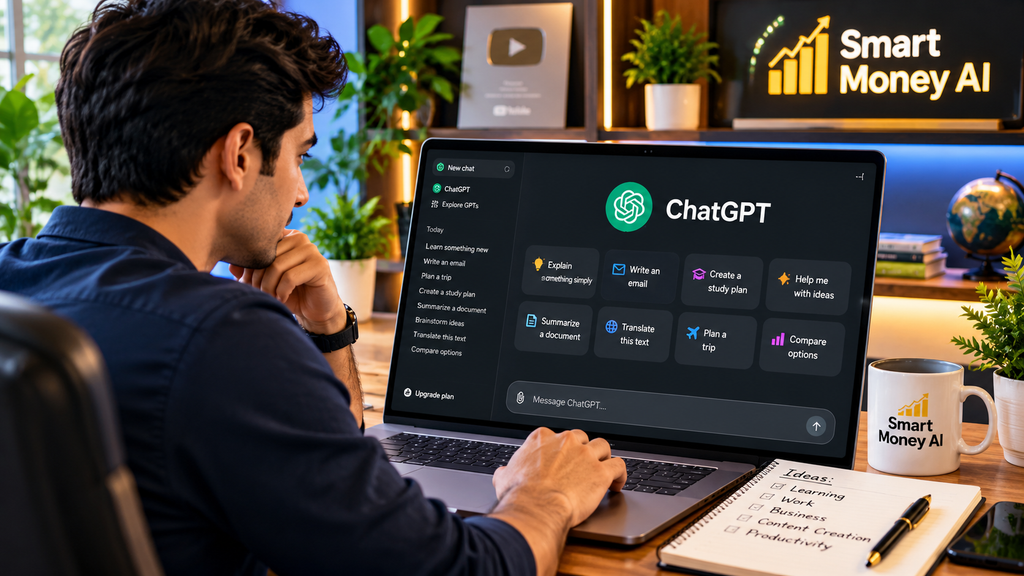
The ChatGPT interface is designed around a conversation.
You will generally find a message box where you can type your questions or instructions.
Enter your message and submit it to receive a response.
Depending on your account, device, and available features, you may also see options for starting new conversations, attaching files, using voice, or choosing different capabilities.
The interface can change as OpenAI updates its products.
For your first conversation, try something simple:
Example prompt:
“Explain artificial intelligence in simple English for someone who has never studied technology.”
Read the response and ask a follow-up question if anything is unclear.
Step 3: Learn How to Write Effective ChatGPT Prompts
A prompt is the instruction or question you give ChatGPT.
The quality of your prompt can influence how useful the response is.
A vague prompt might produce a general answer, while a specific prompt usually gives ChatGPT a clearer direction.
Example of a Basic Prompt
“Write about time management.”
This prompt provides very little context.
Example of a Better Prompt
“Write a beginner-friendly guide explaining five practical time-management techniques for people working from home. Use simple language and include one example for each technique.”
The second prompt identifies the topic, audience, format, and desired level of detail.
A Simple Prompt Formula
A useful beginner-friendly formula is:
Task + Context + Audience + Format + Requirements
For example:
“Create a weekly content plan for a beginner technology blog targeting readers in the United States. Present the plan in a table with article topics, target audiences, and suggested headlines.”
You do not need to follow this formula every time, but it can help you communicate your needs clearly.
Step 4: Use ChatGPT for Everyday Tasks
One of the easiest ways to learn ChatGPT is to practice with tasks you already understand.
Here are several examples.
1. Writing Professional Emails
ChatGPT can help draft messages for different situations.
Example prompt:
“Write a polite email asking a customer support team for an update on a service request. Keep the message professional, friendly, and under 150 words.”
Review the email carefully before sending it.
Make sure the details, dates, names, and requests are correct.
2. Learning New Skills
You can use ChatGPT to break unfamiliar subjects into manageable lessons.
Example prompt:
“Teach me the basics of Microsoft Excel. Create a seven-day beginner learning plan with one practical exercise per day.”
You can then ask ChatGPT to explain individual lessons in greater detail.
3. Creating Blog Content Ideas
Bloggers can use ChatGPT for brainstorming, outlines, and editing.
Example prompt:
“Suggest 15 useful blog article ideas about AI tools for beginners. Focus on practical problems readers want to solve. Avoid exaggerated income claims.”
Use these suggestions as starting points rather than publishing them without research.
4. Improving Your Writing
ChatGPT can help identify unclear sentences, improve structure, and suggest alternative wording.
Example prompt:
“Review the following paragraph for grammar, clarity, and readability. Preserve the original meaning and explain the most important improvements.”
Paste the paragraph below your instruction.
5. Organizing Projects
ChatGPT can help turn large goals into smaller tasks.
Example prompt:
“Create a realistic four-week plan for launching a beginner-friendly educational website. Include content planning, website checks, and basic search engine optimization.”
Remember that AI-generated plans should be adapted to your actual resources and schedule.
Step 5: Ask Follow-Up Questions
One useful feature of conversational AI is the ability to refine an answer.
You do not have to write a perfect prompt on your first attempt.
Suppose you ask:
“Explain SEO for beginners.”
After reading the answer, you could continue with:
“Give me a practical example for a technology blog.”
Then:
“Explain the difference between a page title and a meta description.”
Finally:
“Create a checklist I can use before publishing my first article.”
This approach allows you to build understanding through a conversation.
Step 6: Use ChatGPT for Research Carefully
ChatGPT can help you identify research questions, compare concepts, and understand unfamiliar terminology.
However, it should not automatically be treated as a verified source.
AI-generated responses can contain mistakes, outdated information, or invented references.
For research tasks, consider asking ChatGPT to identify uncertainties and provide sources when supported by the available features.
Example prompt:
“Explain the main differences between organic search traffic and paid advertising. Identify any claims that should be verified using official documentation.”
When researching software, pricing, laws, medical information, or financial decisions, consult authoritative sources before acting.
Step 7: Explore ChatGPT Features Gradually
Depending on your account and the features currently available, ChatGPT may support additional ways of working.
These can include:
- Conversations using text.
- Voice interactions.
- Working with uploaded documents.
- Understanding images.
- Helping with coding.
- Research and analysis tools.
- Creating or editing visual content.
Some capabilities may have usage limits or require a particular subscription.
Beginners do not need to learn every feature immediately.
Start with basic conversations and explore additional tools when you have a practical reason to use them.
Step 8: Understand ChatGPT Free and Paid Options
ChatGPT offers free access as well as paid subscription options.
The exact features, models, limits, and subscription prices may change.
For beginners, the free version can be a useful starting point for experimenting with prompts and everyday tasks.
A paid plan may be worth considering if you regularly need capabilities or higher usage limits that are not included in your current access.
Before subscribing, review the latest details on the official ChatGPT website.
Avoid purchasing a subscription simply because a video or advertisement promises guaranteed productivity or income results.
Step 9: Protect Your Privacy When Using ChatGPT
AI tools can be convenient, but users should think carefully about what information they share.
Avoid entering passwords, one-time security codes, banking credentials, or other sensitive personal information into prompts.
When working with business documents or customer information, remove unnecessary identifying details and follow any applicable privacy requirements.
Also review the privacy and data-control options available in your ChatGPT account.
For important decisions, use AI as a supporting tool rather than the sole decision-maker.
Step 10: Avoid Common Beginner Mistakes
Mistake 1: Writing Extremely Vague Prompts
A prompt such as “Help me with business” does not explain the task.
Instead, describe the specific problem you want to solve.
Mistake 2: Trusting Every AI Answer
ChatGPT can produce convincing responses that contain factual errors.
Verify important information independently.
Mistake 3: Copying AI Content Without Reviewing It
AI-generated text may contain generic explanations, repetition, or inaccuracies.
Edit it to improve originality, usefulness, and accuracy.
Mistake 4: Sharing Sensitive Information
Do not paste confidential information into an AI conversation unless you understand the relevant privacy protections and have permission to share it.
Mistake 5: Expecting AI to Do Everything Perfectly
ChatGPT is most useful when combined with human judgment, research, creativity, and review.
10 Useful ChatGPT Prompts for Beginners
Here are ten prompts you can adapt for your own needs.
Prompt 1 — Learning
“Explain [topic] in simple language, using three everyday examples.”
Prompt 2 — Writing
“Help me rewrite this paragraph to make it clearer and more professional without changing its meaning.”
Prompt 3 — Productivity
“Create a realistic daily schedule for completing [task] while allowing time for breaks.”
Prompt 4 — Research
“Give me an overview of [topic], explain the key concepts, and identify important facts I should verify.”
Prompt 5 — Blogging
“Create an outline for a helpful beginner blog post about [topic]. Include common questions readers may have.”
Prompt 6 — YouTube
“Suggest ten educational YouTube video ideas about [topic] for a beginner audience.”
Prompt 7 — Studying
“Quiz me on [subject] with five questions, one at a time, and explain the correct answers.”
Prompt 8 — Career Skills
“Create a beginner learning roadmap for developing [skill], including free learning activities.”
Prompt 9 — Comparing Options
“Compare [option A] and [option B] based on features, limitations, and suitability for beginners.”
Prompt 10 — Problem Solving
“Help me solve [problem] step by step. Ask for any essential missing information before recommending a solution.”
These prompts are templates. Replace the words in brackets with your own details.
How to Use ChatGPT for Beginners: Tips for Better Results
Getting better results usually involves a few simple habits.
First, explain your goal clearly.
Second, provide relevant background information without sharing unnecessary personal details.
Third, tell ChatGPT how you want the answer presented.
Fourth, ask follow-up questions whenever an explanation is confusing or incomplete.
Finally, review the response before using it.
With practice, you can learn which prompting techniques work best for different tasks.
Can ChatGPT Help You Develop Digital Skills?
Yes. ChatGPT can support learning in areas such as writing, spreadsheets, basic programming, digital marketing, content planning, and research.
For example, a beginner learning website development might ask ChatGPT to explain HTML elements and then request a simple practice exercise.
Someone learning digital marketing might ask for an explanation of keywords, search intent, and website analytics.
However, developing real skills requires practice and independent understanding.
Reading AI-generated explanations alone is not a substitute for applying what you learn.
Can You Use ChatGPT to Make Money Online?
ChatGPT may help with legitimate work activities such as drafting content, organizing research, learning digital skills, or improving productivity.
However, using ChatGPT does not guarantee earnings.
Income depends on factors such as your skills, the quality of your work, market demand, competition, and the rules of the platforms you use.
Be cautious of claims that AI tools can generate large amounts of money automatically with no effort or experience.
A more practical approach is to develop a useful skill, understand your audience or customers, and use AI to support responsible work.
Frequently Asked Questions About ChatGPT
Is ChatGPT Easy for Beginners?
Yes. ChatGPT is designed to accept natural-language questions, so beginners can start without programming knowledge.
Can I Use ChatGPT for Free?
ChatGPT offers free access, although available features and usage limits can change. Check the official website for current details.
Do I Need Coding Knowledge to Use ChatGPT?
No. Most everyday tasks can be completed by writing ordinary instructions.
Can ChatGPT Write Blog Articles?
ChatGPT can help with outlines, drafts, editing, and brainstorming. However, blog owners should verify information, add original value, and review content before publication.
Is ChatGPT Always Accurate?
No. ChatGPT can make mistakes. Verify important claims using reliable sources.
Can ChatGPT Replace Google Search?
ChatGPT can help explain information and support research, but conventional search engines and authoritative websites remain valuable for finding and verifying sources.
What Is the Best Way to Learn ChatGPT?
Start with a simple task, practice writing specific prompts, and use follow-up questions to improve the results.
Once you understand the basics of ChatGPT, you can explore its applications in online marketing. Read our AI for Digital Marketing in 2026 guide to learn how AI can assist with SEO, content creation, and marketing campaigns.
Conclusion
Learning how to use ChatGPT for beginners does not require technical expertise. The most effective way to get started is to ask simple questions, experiment with clear prompts, and gradually explore more useful tasks.
ChatGPT can support writing, learning, research, organization, and digital skill development. But its greatest value comes when you combine AI assistance with careful judgment and independent verification.
Start with one practical task today, evaluate the response, and improve your prompts as you gain experience.
For a broader introduction to useful AI platforms, also read our guide: 10 Best AI Tools for Beginners: A Practical Guide.
Disclaimer: This article is for educational purposes. ChatGPT features, pricing, and availability may change. Always verify important information using official sources.