
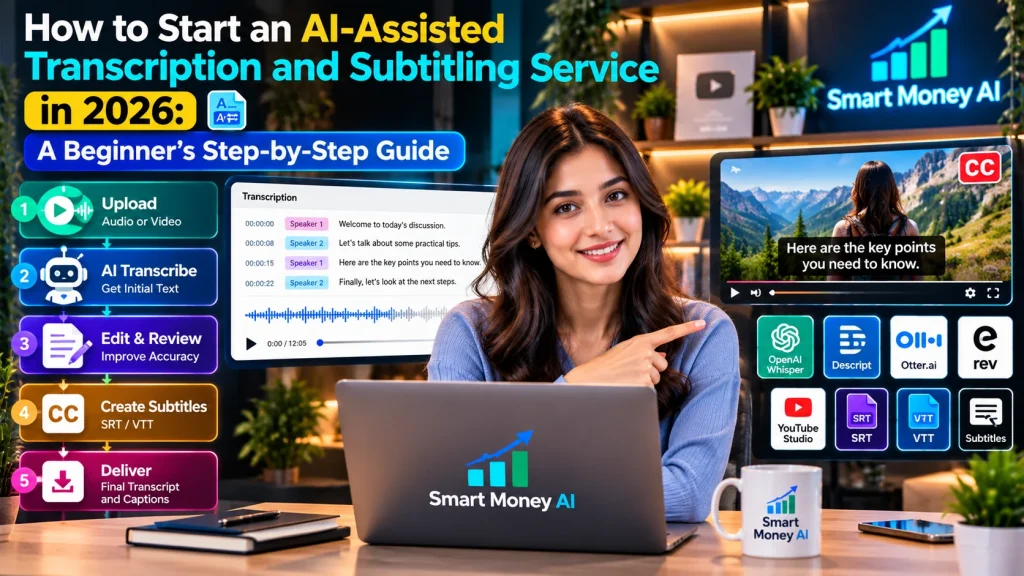
Video content, online meetings, interviews, podcasts, and digital courses have created many situations where people need accurate written records of spoken information. Businesses and creators may also need captions or subtitles to make their videos easier to understand and more accessible.
Artificial intelligence can help with these tasks by generating an initial transcript from audio or video. However, AI-generated text often requires human review to correct mistakes, identify speakers, and ensure that the final result accurately reflects the recording.
This combination of AI assistance and careful human editing creates an opportunity to develop useful digital skills and potentially offer transcription and subtitling services.
If you’re wondering how to start a transcription service in 2026, this guide explains the process from beginning to end.
You’ll learn about transcription and subtitles, useful software, service packages, sample pricing in US dollars, quality control, client communication, and practical steps for building a portfolio.
You’ll also discover why accuracy, privacy, accessibility, and realistic client expectations matter more than promises of effortless AI income.
Learning how to start a transcription service begins with understanding client requirements, choosing reliable AI tools, and developing strong proofreading skills.
Table of Contents
What Is an AI-Assisted Transcription and Subtitling Service?
An AI-assisted transcription service converts spoken audio into written text using automated speech-recognition software followed by human editing.
A subtitling service adds synchronized text to video content so viewers can follow spoken dialogue.
For example, a podcast creator might need a written transcript of a 30-minute interview. A video creator might want captions for an educational tutorial.
An AI tool can produce an initial draft, but the service provider reviews the output, corrects errors, and delivers a usable file.
The goal is not simply to generate text quickly. It is to provide an accurate, readable, and properly formatted result.
Transcription vs. Captions vs. Subtitles
These terms are related but have different meanings.
Transcription: A written record of spoken content.
Captions: Synchronized text that represents dialogue and, when appropriate, meaningful sounds or speaker information.
Subtitles: Synchronized text commonly used to represent spoken dialogue, including translation into another language when requested.
The exact terminology can vary between platforms and clients.
When discussing a project, ask the client which type of deliverable they actually need.
Why Consider Transcription and Subtitling Skills in 2026?
Several kinds of organizations regularly produce audio and video content.
Examples include:
- Educational content creators
- Podcast producers
- Small businesses
- Marketing agencies
- Online course instructors
- Video editors
- Community organizations
- Researchers conducting permitted interviews
- Businesses preparing internal training materials
Some may need transcripts for editing, searchable records, or content repurposing.
Others may need captions to improve accessibility and make videos easier to follow.
However, demand varies by industry, budget, language, and quality requirements. AI tools have also increased competition and reduced the value of basic automated transcription.
A beginner should therefore focus on accuracy, formatting, reliability, and specialized services rather than assuming clients will pay for unedited AI output.
Benefits of Using AI for Transcription Work
AI tools can assist with several parts of the workflow.
1. Generate an Initial Draft
Speech-recognition software can produce a preliminary transcript much faster than typing every word manually.
2. Identify Possible Speaker Changes
Some tools attempt to distinguish between different speakers.
These labels must be checked because automated speaker identification can be incorrect.
3. Create Time-Aligned Text
Certain tools generate timestamps that help synchronize text with audio or video.
4. Support Caption File Creation
Some applications can export subtitle formats such as SRT or VTT.
5. Reduce Repetitive Work
AI assistance can allow more time for editing, quality control, and client communication.
Important Limitation
AI is not equally accurate for every recording.
Background noise, overlapping speech, unfamiliar names, accents, specialized terminology, and poor audio quality can create substantial errors.
Human review remains essential when accuracy matters.
Step 1: How to Start a Transcription Service — Choose Your Services
Before selecting software, decide what services you want to provide.
Beginners may find it easier to start with one or two clear offerings.
General Audio Transcription
Convert clear recordings into readable text.
Possible projects include podcasts, interviews, and educational discussions.
Video Transcription
Create written transcripts of video recordings.
Caption Creation
Prepare synchronized captions for videos, including speaker identification and relevant non-speech information when required.
Subtitle Formatting
Convert approved transcripts into properly timed subtitle files.
Transcript Cleanup
Correct grammar, punctuation, speaker labels, and formatting while preserving the intended meaning.
Content Repurposing Support
With the client’s permission, organize transcripts into summaries, show notes, or content outlines.
Beginner Recommendation
Start with general transcription and basic caption editing using clear English recordings.
Expand into more specialized work after developing reliable editing and quality-control skills.
Step 2: Understand the Skills You Need
You don’t need to be a professional programmer to begin learning transcription.
However, several practical skills are important.
Strong Listening Skills
You must be able to recognize words accurately, even when speakers talk quickly or use unfamiliar expressions.
English Language Skills
For US clients, become comfortable with American English spelling, punctuation, and common expressions.
Follow the client’s preferred style when it differs from your default.
Attention to Detail
Small mistakes can change the meaning of a sentence.
Basic Computer Skills
You should know how to manage files, edit documents, and export different formats.
If you’re new to working with digital tools, our guide to 10 Best Digital Skills to Learn in 2026 for Beginners can help you build a stronger foundation before offering professional transcription services.
Time Management
Transcription work can take significantly longer than the recording itself.
Client Communication
Clear questions and timely updates help prevent misunderstandings.
Confidentiality
You must handle client recordings responsibly and follow any agreed privacy requirements.
Step 3: Learn the Most Common Transcript Formats
Clients may request different transcript styles.
Verbatim Transcription
Verbatim transcription preserves spoken wording, including repetitions and filler words when required.
It is useful when a detailed record of speech matters.
Clean-Read Transcription
Clean-read transcription removes unnecessary filler words and improves readability without changing the speaker’s meaning.
It is often useful for podcasts and general business content.
Timestamped Transcription
A timestamped transcript includes time references.
For example:
[00:01:15] Speaker 1: Welcome to today’s discussion.
Timestamps help readers locate particular moments in a recording.
Speaker-Labeled Transcription
This format identifies speakers.
For example:
Host: What inspired you to start the project?
Guest: We wanted to make learning more accessible.
Before beginning a project, confirm the client’s preferred format.
Step 4: Explore AI Transcription Tools
Several applications can assist with speech recognition, transcript editing, and caption creation.
The best choice depends on the recording type, budget, privacy requirements, supported languages, and desired output.
OpenAI Whisper
Whisper is a speech-recognition model that can transcribe audio and support multilingual workflows.
It may be used through compatible applications or developer implementations.
Different implementations can have different features, costs, and privacy practices.
You can explore the official OpenAI Whisper repository to understand its speech recognition capabilities, supported features, and technical requirements.
Descript
Descript provides tools for editing audio and video using text-based workflows.
Depending on the available plan and features, it can assist with transcription, editing, and captions.
Visit the official Descript website to explore its transcription, text-based editing, and video captioning features before selecting a subscription.
Otter.ai
Otter.ai focuses on meeting transcription, notes, and related productivity workflows.
It may be useful for certain business recordings, subject to the service’s current capabilities and privacy requirements.
The official Otter.ai website explains its AI meeting transcription, automated notes, and collaboration features.
Rev
Rev provides transcription and captioning services and related technology options.
Its offerings may include automated and human-assisted services.
Explore the official Rev website to learn about its transcription and captioning services and compare available options.
YouTube Studio
YouTube offers automatic captioning features for supported videos.
Creators can review and edit captions to improve accuracy.
For video creators, YouTube’s official caption management guide explains how to add, edit, and manage subtitles and captions in YouTube Studio.
How to Compare Tools
Evaluate:
- Transcription accuracy
- Export formats
- Speaker identification
- Timestamp support
- Caption editing
- Supported languages
- File size and duration limits
- Pricing
- Data retention policies
- Client confidentiality requirements
Don’t select a tool based only on advertising claims.
Test it using recordings you own or have permission to process.
If you’re just getting started with artificial intelligence, our guide on How to Use ChatGPT for Beginners explains essential AI concepts and practical ways to work with AI-powered tools.
Step 5: Practice With a Short Recording
Before offering services, practice with a five-minute recording.
Choose audio that you created yourself or have permission to use.
Practice Workflow
- Upload the recording to an appropriate transcription tool.
- Generate an initial transcript.
- Listen to the original recording.
- Compare the transcript with the audio.
- Correct misheard words.
- Add punctuation.
- Check names and terminology.
- Format the final document.
- Export the transcript.
- Review the exported file.
Keep notes about the errors you encounter.
For example, the tool might confuse a company name with a similar-sounding common word.
Learning to identify these mistakes is an important part of becoming a reliable editor.
Step 6: Build a Reliable Transcription Workflow
A repeatable process helps you deliver consistent results.
When learning how to start a transcription service, creating a repeatable workflow helps you maintain accuracy, organize projects, and meet client expectations.
Use the following workflow for every project.
Stage 1: Receive and Review the Recording
Check the audio duration, quality, language, number of speakers, and requested format.
Stage 2: Confirm Permission and Privacy
Make sure you are authorized to process the recording using the selected software.
Stage 3: Generate the Initial Transcript
Use an appropriate AI transcription tool to create a first draft.
Stage 4: Review Against the Original Audio
Listen carefully while checking the generated text.
Stage 5: Correct Errors
Fix incorrect words, punctuation, speaker labels, and formatting.
Stage 6: Verify Important Details
Check names, technical terms, dates, and numbers when they can be confirmed.
Stage 7: Perform Final Quality Control
Review the transcript for consistency and completeness.
Stage 8: Export and Deliver
Provide the agreed file format through an approved delivery method.
A reliable process is more valuable than simply producing a transcript quickly.
Step 7: Learn How to Create Subtitles
Subtitling adds another skill to your service offerings.
A basic subtitle workflow involves:
- Preparing an accurate transcript.
- Dividing dialogue into readable segments.
- Assigning start and end times.
- Reviewing synchronization.
- Checking readability.
- Exporting the subtitle file.
- Testing the subtitles with the video.
What Is an SRT File?
SRT stands for SubRip Subtitle.
It is a commonly used subtitle format.
An SRT file contains numbered caption blocks, timestamps, and text.
For example:
1
00:00:01,000 –> 00:00:04,000
Welcome to our beginner’s tutorial.
2
00:00:04,500 –> 00:00:07,000
Today, we’ll explore practical digital skills.
This is a simplified example.
Real projects require careful timing, punctuation, and appropriate line breaks.
What Is a VTT File?
WebVTT is another timed-text format commonly used for web-based video.
Some platforms support both SRT and VTT, while others have specific requirements.
Always confirm the client’s preferred format.
For technical details about web-based subtitle files, consult the official W3C WebVTT specification, which explains the structure and timing requirements of WebVTT captions.
Step 8: Understand Caption Accessibility
Captions can improve access to video content for people who are deaf or hard of hearing and can also help viewers in environments where audio is difficult to hear.
However, captions must be accurate and properly synchronized to be useful.
Important Caption Quality Principles
Accuracy: Dialogue should reflect the actual recording.
Timing: Captions should appear when the relevant speech occurs.
Readability: Text should remain on screen long enough to read.
Speaker Identification: Identify speakers when necessary for understanding.
Meaningful Sounds: Include relevant sound information when required for accessible captions.
Consistency: Follow a consistent captioning style.
For professional accessibility work, consult the applicable client specifications and accessibility guidance.
The W3C Web Content Accessibility Guidelines provide important accessibility requirements for prerecorded audio and video, including captions and other alternatives.
Avoid promising full legal or accessibility compliance unless you have the necessary expertise and can verify the deliverable against the relevant requirements.
Step 9: Choose Your Ideal Clients
A clear target audience can make your service easier to explain.
Podcast Creators
They may need transcripts, episode notes, or searchable text.
YouTube Creators
They may need edited captions or subtitle files.
Online Educators
They may need transcripts and captions for course materials.
Small Businesses
They may need approved training-video transcripts or internal communication materials.
Marketing Agencies
They may need caption files and transcript-based content preparation.
Researchers
They may need carefully formatted interview transcripts, subject to participant consent and confidentiality requirements.
Beginner Tip
Start with a specific audience whose needs you understand.
For example:
English-language podcast transcription and caption editing for independent creators.
A focused service description is often easier to communicate than offering every possible transcription service.
Step 10: Create Your Service Packages
Clear packages help clients understand what they will receive.
You might offer three packages.
Basic Package: Clean Transcript
Includes:
- AI-assisted first draft
- Human review
- Corrected punctuation
- Basic formatting
- DOCX or TXT delivery
Standard Package: Transcript With Timestamps
Includes everything in Basic, plus:
- Timestamps at agreed intervals
- Speaker labels
- Additional formatting checks
Premium Package: Transcript and Captions
Includes:
- Edited transcript
- Timed caption file
- SRT or VTT delivery
- Caption synchronization review
- One agreed revision round
Make sure each package clearly states its limitations.
If you want to turn your transcription skills into a structured online service, explore our guide on How to Start an Online Business With AI to understand basic business planning, digital tools, and service development.
For example, difficult audio, multiple speakers, translation, or specialized terminology may require a separate quote.
Step 11: Understand Transcription Pricing
Transcription pricing is often based on the length of the recording rather than the time you spend working.
For example, a client might request transcription of a 30-minute interview.
A service provider could quote a price per recorded audio minute.
Illustrative Beginner Pricing Examples
The following figures are hypothetical examples for planning a service, not verified market averages or guaranteed achievable rates.
| Service | Example Price |
|---|---|
| Basic transcription | $1.00 per audio minute |
| Timestamped transcription | $1.50 per audio minute |
| Transcript plus captions | $2.00 per video minute |
| Specialized or difficult audio | Custom quote |
Example: 30-Minute Podcast
At an illustrative rate of $1.00 per audio minute:
30 × $1.00 = $30
Example: 20-Minute Caption Project
At an illustrative rate of $2.00 per video minute:
20 × $2.00 = $40
These are gross project prices before software expenses, taxes, platform fees, revisions, and other costs.
Actual rates depend on competition, audio quality, client requirements, experience, and the amount of editing involved.
Step 12: Calculate Your Real Working Time
A common beginner mistake is assuming that a 30-minute recording requires only 30 minutes of work.
Even with AI assistance, editing may take considerably longer.
Suppose a 30-minute recording requires:
- 10 minutes for file review and preparation
- 15 minutes for transcription processing and initial checks
- 60 minutes for careful editing
- 20 minutes for formatting and quality control
- 15 minutes for delivery and communication
Total working time:
120 minutes, or 2 hours
If the client pays $30, the effective gross hourly rate is:
$30 ÷ 2 = $15 per hour
That amount is before business expenses and taxes.
The example demonstrates why you should measure actual working time before setting prices.
As your skills improve, you may become more efficient, but results vary by recording.
Step 13: Create a Sample Portfolio
Before approaching clients, prepare examples of your work.
Understanding how to start a transcription service also means learning how to demonstrate your skills through accurate transcripts and professionally formatted subtitle samples.
You don’t need confidential client recordings to build a portfolio.
Use recordings you created yourself or materials that explicitly permit your intended use.
Portfolio Sample 1: Podcast Transcript
Create a short interview-style recording.
Prepare a clean transcript with speaker labels.
Portfolio Sample 2: Video Captions
Create a short educational video.
Generate and edit an SRT caption file.
Portfolio Sample 3: Transcript Cleanup
Show a fictional or self-created example of an imperfect automated transcript alongside the corrected version.
Portfolio Sample 4: Timestamped Transcript
Prepare a short transcript with accurate timestamps.
What to Include
For each sample, explain:
- Recording duration
- Service type
- Final deliverable
- Editing process
- Quality checks performed
Avoid claiming that practice samples were paid client projects.
A transparent portfolio can demonstrate your abilities without misleading potential customers.
Step 14: Create a Professional Service Description
Your service description should explain what you do and who you help.
For example:
AI-Assisted Transcription and Caption Editing for Podcasts and Educational Videos
Then explain your process.
You could describe your service as:
“Accurate, human-reviewed English transcripts and timed caption files for creators and small businesses. AI-assisted drafting, careful proofreading, clear formatting, and agreed delivery timelines.”
Avoid promises such as:
- Perfect accuracy for every recording
- Instant delivery regardless of project size
- Guaranteed earnings
- Automatic legal compliance
- Zero human editing required
Clients benefit from realistic descriptions and clear expectations.
Step 15: Explore Freelance Platforms and Direct Clients
There are several ways to explore potential transcription projects.
Freelance Marketplaces
Platforms such as Upwork and Fiverr may have categories related to transcription, captions, and video services.
Review their current eligibility rules, age requirements, fees, and service policies before using them.
Professional Networking
Professional communities and business contacts may provide opportunities to learn about client needs.
Creator Communities
Some podcast and video creators may need help improving their transcripts or captions.
Direct Business Outreach
Businesses producing educational or training content may occasionally need these services.
Important Reminder
Never guarantee that a platform will provide clients.
Competition can be significant, and some platforms have minimum-age requirements.
If you’re not eligible to use a particular platform, don’t misrepresent your age or account information.
Step 16: Write a Clear Client Proposal
A proposal should focus on the client’s requirements.
Include:
- A brief introduction
- The service you can provide
- Relevant experience or practice samples
- The proposed deliverables
- A realistic turnaround estimate
- Pricing or a request for project details
- A clear next step
Example Proposal
Hello,
I can help prepare a human-reviewed transcript and synchronized captions for your video.
My workflow includes AI-assisted transcription, manual proofreading, timestamp checks, and final formatting.
I can deliver the transcript in DOCX or TXT format and the captions in SRT format, depending on your requirements.
Please share the recording duration, language, audio quality, preferred format, and deadline so I can provide an accurate quote.
Thank you.
A short, specific proposal is usually more useful than a generic message promising exceptional results.
Step 17: Ask the Right Questions Before Accepting Work
Before agreeing to a project, confirm:
- Recording length
- Language and accent
- Number of speakers
- Audio quality
- Transcript style
- Timestamp requirements
- Caption format
- Accessibility requirements
- Deadline
- Revision expectations
- Privacy and confidentiality conditions
- Permission to use AI tools
- Delivery method
- Payment terms
These details help prevent unexpected work and misunderstandings.
For example, a clear 10-minute educational video is very different from a noisy 10-minute group discussion.
Both may have the same duration, but the editing effort can differ substantially.
Step 18: Protect Client Privacy and Confidentiality
Privacy is especially important when handling audio and video recordings.
A recording may contain personal information, private conversations, business details, or confidential research.
Before Uploading a File
Confirm that the client has authorized the use of the selected transcription software.
Review the tool’s data-handling and retention practices.
Consider whether the recording contains sensitive information.
Use appropriate access controls.
During the Project
Store files securely.
Limit access to authorized people.
Avoid sharing recordings through public links.
Follow agreed confidentiality requirements.
After Delivery
Follow the client’s instructions about file retention and deletion.
Don’t reuse private recordings for demonstrations, marketing, or AI training without appropriate permission.
Important
Some clients may prohibit uploading recordings to third-party AI services.
If so, use an approved workflow or decline the project if you cannot meet the requirements.
Step 19: Perform Human Quality Checks
Human review is the most important part of a professional AI-assisted transcription workflow.
Check Names
AI tools may misinterpret names of people, organizations, and products.
Check Numbers
Review prices, percentages, dates, addresses, and measurements carefully.
Check Technical Terms
Industry-specific vocabulary can cause transcription errors.
Check Speaker Labels
Make sure dialogue is assigned to the correct person.
Check Missing Words
AI tools may omit quiet or overlapping speech.
Check Punctuation
Punctuation should improve readability without changing meaning.
Check Timestamps
Verify that time references match the recording.
Check Final Exports
Open the delivered files and confirm that they display correctly.
If any portion remains unclear, flag it according to the client’s agreed conventions rather than inventing missing words.
Step 20: Understand Common Transcription Challenges
Transcription is not always straightforward.
Background Noise
Traffic, music, or other sounds may interfere with speech recognition.
Multiple Speakers
Overlapping dialogue can make speaker identification difficult.
Unfamiliar Accents
Speech-recognition accuracy may vary across accents and speaking styles.
Specialized Vocabulary
Medical, legal, scientific, or technical terms may require additional expertise.
Poor Recording Quality
Distorted or quiet recordings may be difficult to transcribe accurately.
Rapid Speech
Fast dialogue can create missing or incorrectly combined words.
Practical Solution
Review the recording before quoting a price.
If the audio is difficult, communicate the limitations and expected additional effort.
For specialized work, avoid accepting projects that require qualifications or accuracy standards you cannot meet.
Step 21: Create a Simple Project Tracking System
Even a small service benefits from organized project management.
You can use a spreadsheet to track:
| Project | Client | Duration | Service | Deadline | Status |
|---|---|---|---|---|---|
| Podcast Episode 1 | Sample Client A | 30 min | Transcript | Nov 5 | Editing |
| Training Video | Sample Client B | 20 min | Captions | Nov 7 | Pending |
| Interview Recording | Sample Client C | 15 min | Timestamped Transcript | Nov 9 | Completed |
These are fictional examples.
You can add columns for:
- Quoted price
- Payment status
- Revision requests
- Delivery date
- Actual working time
A simple tracker helps you manage deadlines and understand the profitability of different project types.
Step 22: Use AI Responsibly in Your Workflow
AI can support transcription work, but it should not replace professional judgment.
Appropriate Uses
- Producing an initial transcript
- Suggesting punctuation
- Creating draft timestamps
- Supporting subtitle formatting
- Organizing approved content
- Identifying sections that may need review
Practices to Avoid
- Delivering unreviewed AI output as guaranteed accurate
- Inventing words when audio is unclear
- Uploading confidential recordings without permission
- Misrepresenting AI-generated text as independently verified
- Promising compliance with standards you haven’t assessed
- Sharing copyrighted recordings without authorization
Transparency and careful review help build trust.
Step 23: Explore Additional Services as Your Skills Improve
After gaining experience, you may consider related services.
Podcast Show Notes
Create summaries and episode outlines from approved transcripts.
Video Chapter Markers
Identify useful timestamps for navigating longer videos.
Transcript Formatting
Prepare transcripts for publication or internal documentation.
Caption Quality Review
Correct existing caption files.
Educational Content Support
Organize approved lecture transcripts into readable study materials.
Multilingual Subtitles
Offer translation-related services only if you have the necessary language skills and review process.
Important
Each additional service requires its own quality standards and pricing considerations.
If you’re interested in expanding into related freelance opportunities, our guide on How to Start an AI-Assisted Content Writing Business in 2026 explains how AI can support writing workflows, editing, and client-focused content services.
Don’t expand into specialized work before you’re prepared to deliver it reliably.
Step 24: Avoid Common Beginner Mistakes
Mistake 1: Trusting AI Output Completely
Automated transcription can contain serious errors.
Better approach: Review the recording and correct the transcript.
Mistake 2: Charging Without Measuring Work Time
A project may take longer than expected.
Better approach: Track your editing time before setting rates.
Mistake 3: Ignoring Client Requirements
A client may need captions rather than a plain transcript.
Better approach: Confirm deliverables before starting.
Mistake 4: Accepting Poor-Quality Audio Without Review
Difficult recordings can require substantial additional work.
Better approach: Assess audio quality before quoting.
Mistake 5: Sharing Confidential Files
Unauthorized sharing can damage client trust and create legal risks.
Better approach: Follow approved privacy and storage procedures.
Mistake 6: Offering Too Many Services Immediately
Trying to handle transcription, translation, advanced accessibility, and specialized technical content at once can reduce quality.
Better approach: Start with a narrow service and expand gradually.
Mistake 7: Promising Guaranteed Income
Freelance earnings are uncertain.
Better approach: Treat transcription as a skill-based service that requires practice, client development, and consistent work.
Step 25: Create a Seven-Day Beginner Learning Plan
A structured practice schedule can help you develop foundational skills.
Day 1: Learn the Basics
Understand transcription, captions, subtitles, and common file formats.
Day 2: Compare AI Tools
Test one or two suitable tools using permitted recordings.
Day 3: Practice Transcript Editing
Correct a short AI-generated transcript while listening to the original audio.
Day 4: Learn Caption Timing
Create and review a short SRT file.
Day 5: Build Portfolio Samples
Prepare a transcript and caption sample using your own content.
Day 6: Develop Your Service Packages
Define deliverables, estimate work time, and calculate example pricing.
Day 7: Review Your Workflow
Test your process from receiving a recording to exporting the final files.
At the end of the week, evaluate which skills need more practice.
A seven-day plan can help you get started, but professional proficiency may require considerably more time and experience.
Frequently Asked Questions About AI Transcription Services
1. Can beginners learn AI-assisted transcription?
Yes. Beginners can learn the fundamentals using short practice recordings, transcription software, and careful human editing.
2. Do I need expensive software?
Not necessarily. Some tools offer free or limited-use options, while others require subscriptions or usage-based payments. Compare current plans before choosing.
3. Can AI transcribe audio perfectly?
No. Accuracy varies with audio quality, language, accents, background noise, and specialized terminology.
4. What is the difference between transcription and subtitling?
Transcription produces written text from speech. Subtitling adds time-synchronized text to video, potentially including translation.
5. What file formats should I learn?
Useful formats include TXT, DOCX, SRT, and VTT. Client requirements determine which formats you need.
6. How should I price transcription services?
Consider recording length, audio difficulty, number of speakers, editing time, turnaround requirements, and expenses. The pricing examples in this guide are illustrative, not market averages.
7. Can I offer transcription services to US clients?
Potentially, subject to applicable laws, platform eligibility, payment arrangements, and client requirements. Strong English editing skills and reliable communication are important.
8. Do clients need to know that I use AI?
Follow client agreements and disclosure requirements. Be transparent when AI use affects confidentiality, processing methods, or the agreed service.
9. Can I transcribe private meetings?
Only when you have appropriate authorization and can comply with relevant privacy, consent, and confidentiality requirements.
10. Is transcription a guaranteed way to make money online?
No. Earnings depend on client demand, competition, skills, pricing, expenses, and the ability to deliver quality work.
11. Can I use AI to translate subtitles?
AI may help generate translation drafts, but accurate translation requires appropriate language expertise and review, especially for specialized or sensitive content.
12. What should I do when a word is impossible to understand?
Don’t guess. Recheck the audio and use an agreed notation for unclear speech when the recording cannot be reliably understood.
Final Thoughts: Is an AI-Assisted Transcription Service Worth Exploring in 2026?
Learning how to start a transcription service can be a practical way to develop skills in audio processing, language editing, caption formatting, and digital project management.
AI tools can make the initial transcription process more efficient, but they do not eliminate the need for careful listening, proofreading, and quality control.
A useful beginner approach is to start with short recordings, learn one transcription tool, practice creating accurate transcripts, and gradually develop caption-editing skills.
Before offering paid services, prepare honest portfolio samples, understand your actual working time, and establish clear expectations about pricing, confidentiality, and deliverables.
There is no guarantee of earning money from transcription work. However, the underlying skills can be valuable for creators, businesses, educators, and other organizations that work with audio and video.
Focus on delivering accurate, accessible, and dependable results rather than simply relying on automated output.
As you continue learning how to start a transcription service, prioritize client satisfaction, accurate editing, responsible AI use, and continuous skill development.
Smart Money AI helps beginners explore AI tools, develop practical digital skills, and understand online opportunities through clear, responsible, and actionable guides.