
Running a small business involves much more than selling products or delivering services. Business owners also need to manage emails, prepare marketing content, communicate with customers, organize projects, and handle everyday administrative work.
Artificial intelligence can make some of these activities easier.
Choosing the best AI tools for small business starts with understanding which daily tasks need improvement and which applications can genuinely help.
The best AI tools for small business can help owners draft content, organize information, brainstorm marketing campaigns, improve customer communication, and reduce repetitive work. However, choosing the right tool matters more than subscribing to several AI services at once.
If you’re just getting started with artificial intelligence, explore our guide to the best AI tools for beginners to understand the basics before choosing tools for your business.
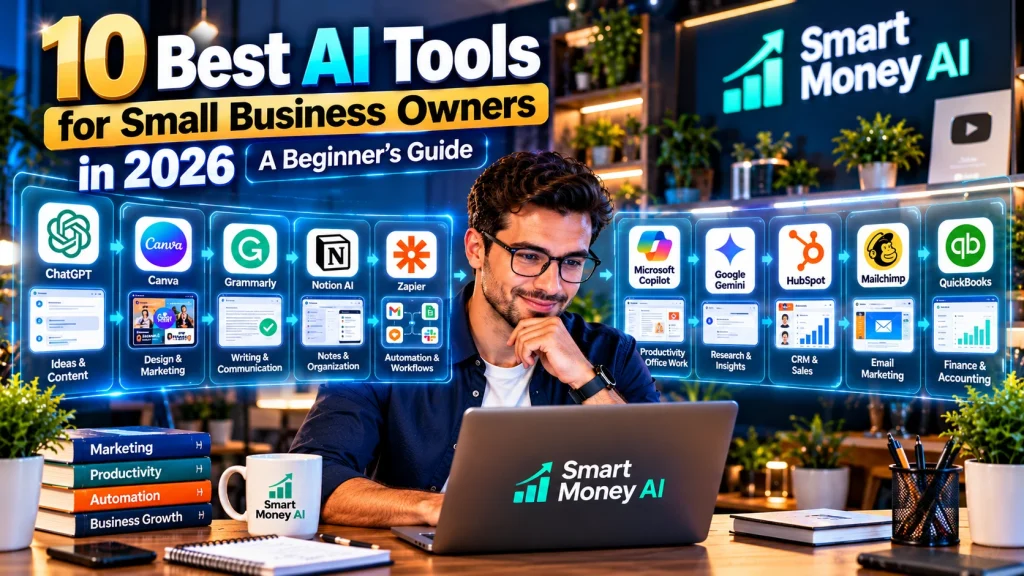
In this beginner-friendly guide, we’ll explore 10 useful AI tools for small-business owners in 2026, their practical applications, their limitations, and how to choose the right option for your business.
Table of Contents
Why Small Businesses Are Using AI
Small businesses often operate with limited time, staff, and resources. AI tools can assist with tasks that would otherwise require considerable manual effort.
For example, a local bakery might use AI to brainstorm social media captions, while a freelance designer might use it to prepare client proposals. An online store might use AI to draft product descriptions, and a consulting business might use it to summarize meeting notes.
Some common business applications include:
- Drafting emails and customer responses
- Creating social media content
- Organizing projects and tasks
- Preparing marketing materials
- Summarizing documents and meetings
- Generating ideas for blog posts
- Assisting with website content
- Automating routine administrative processes
AI is not a substitute for business judgment. Its outputs should be checked for accuracy, privacy, and suitability before being used with customers.
10 Best AI Tools for Small Business Owners in 2026
1. ChatGPT — Best for General Business Assistance
ChatGPT is a versatile AI assistant that can help small-business owners with writing, planning, research support, and everyday business tasks.
Useful business applications:
- Drafting professional emails
- Brainstorming marketing ideas
- Preparing customer-service response templates
- Creating outlines for blog posts
- Summarizing information
- Developing basic business checklists
Practical example:
A small online retailer could ask ChatGPT to draft three versions of a product announcement for different audiences.
The owner should then review the wording, verify product details, and adapt the message to the company’s brand voice.
Advantages: Flexible, beginner-friendly, and useful across multiple business functions.
Limitations: Responses can contain inaccuracies. Sensitive customer or company information should not be entered without understanding the applicable privacy controls.
2. Canva — Best for Marketing Graphics and Visual Content
Canva provides design tools that help businesses create marketing materials without advanced graphic-design experience.
Its AI-assisted features can support content creation and design workflows.
Useful business applications:
- Social media graphics
- Promotional posters
- Presentations
- Product announcements
- Flyers and marketing materials
- Simple branded visual content
Practical example:
A local coffee shop could create a promotional graphic for a weekend event, customize the colors and logo, and prepare versions for different social platforms.
Advantages: Accessible templates, easy editing, and useful brand-design features.
Limitations: Some features require paid access. AI-generated visuals should be reviewed for errors, licensing considerations, and brand consistency.
3. Grammarly — Best for Business Writing and Communication
Clear communication matters when working with customers, suppliers, and business partners.
Grammarly offers writing assistance, including suggestions for grammar, clarity, and tone.
Useful business applications:
- Reviewing customer emails
- Improving business proposals
- Editing website copy
- Refining professional messages
- Making written communication clearer
Practical example:
A freelance consultant could use Grammarly to review a client proposal before sending it.
Advantages: Helpful for everyday written communication and proofreading.
Limitations: Automated suggestions may not always match the intended meaning or tone. Important messages still require a final human review.
4. Notion AI — Best for Business Notes and Knowledge Organization
Small businesses accumulate documents, meeting notes, instructions, and project information.
Notion combines a flexible workspace with AI-assisted features that can help teams work with information stored in their workspace.
Useful business applications:
- Organizing business documents
- Summarizing meeting notes
- Drafting internal procedures
- Maintaining project information
- Creating reusable business templates
Practical example:
A small marketing agency could keep project briefs, meeting notes, and client workflows in a shared workspace.
Advantages: Useful for combining documentation and project information.
Limitations: Setup requires planning, and some AI capabilities depend on the selected plan.
5. Zapier — Best for Connecting Business Apps and Automating Workflows
Zapier helps businesses connect supported applications and automate actions between them.
Its automation capabilities can reduce repetitive administrative tasks, while AI-related features support selected workflows.
Useful business applications:
- Connecting contact forms with spreadsheets
- Organizing incoming leads
- Sending internal notifications
- Moving information between supported applications
- Automating routine follow-up processes
Practical example:
When a potential customer submits a website inquiry, an automation could add the inquiry to a tracking system and notify the appropriate team member.
Advantages: Integrates many commonly used business applications.
Limitations: Automation needs testing and maintenance. Available features, usage allowances, and pricing vary by plan.
6. Microsoft Copilot — Best for Microsoft-Based Business Workflows
Businesses already using Microsoft products may find Copilot useful for AI-assisted work.
Depending on the product and subscription, Copilot features can help with drafting, summarizing, analyzing, and organizing information.
Useful business applications:
- Preparing document drafts
- Summarizing business information
- Assisting with presentations
- Working with spreadsheets
- Supporting selected Microsoft 365 workflows
Practical example:
A business manager could use supported Copilot features to help organize information for a monthly operations report.
Advantages: Particularly relevant for businesses already using Microsoft tools.
Limitations: Features differ across Copilot products, business subscriptions, and applications. AI-generated analysis must be verified.
7. Google Gemini — Best for Google-Based Business Tasks
Gemini is Google’s AI assistant and is relevant to businesses that use Google products.
It can assist with brainstorming, writing, research support, and selected productivity workflows.
Useful business applications:
- Drafting marketing ideas
- Preparing outlines
- Summarizing information
- Brainstorming customer communication
- Supporting research and planning
Practical example:
A small service business could use Gemini to generate a draft FAQ covering common customer questions.
The business should verify every answer before publishing it.
Advantages: Useful general-purpose assistant, particularly for users familiar with Google’s ecosystem.
Limitations: Features and integrations vary by account and subscription. Generated answers can be inaccurate.
8. HubSpot — Best for Customer Relationship Management and Marketing
HubSpot provides customer relationship management, marketing, and customer-service tools, including AI-assisted capabilities.
It may be useful for small businesses looking to organize customer interactions and marketing activities.
Useful business applications:
- Managing customer contacts
- Organizing sales opportunities
- Preparing marketing content
- Tracking customer interactions
- Supporting customer-service workflows
Practical example:
A small consulting company could use a CRM to keep track of prospective clients, follow-up tasks, and ongoing customer relationships.
Advantages: Brings multiple customer-facing business functions into one ecosystem.
Limitations: Some advanced features require paid subscriptions, and businesses should consider implementation complexity.
9. Mailchimp — Best for Email Marketing Assistance
Email marketing helps businesses communicate with customers who have chosen to receive updates.
Mailchimp provides email-marketing tools and selected AI-assisted capabilities for creating and improving campaigns.
Useful business applications:
- Preparing email newsletters
- Drafting promotional messages
- Organizing subscriber audiences
- Creating campaign content
- Reviewing campaign performance
Practical example:
A neighborhood bookstore could prepare a monthly email highlighting new arrivals and upcoming events.
Advantages: Useful for businesses building permission-based email communication.
Limitations: Features and pricing vary. Businesses must follow applicable email-marketing and privacy requirements.
10. QuickBooks — Best for AI-Assisted Financial Administration
QuickBooks provides accounting and financial-management software for businesses, with automation and AI-assisted features in supported products.
Useful business applications:
- Organizing financial records
- Tracking invoices
- Categorizing transactions
- Reviewing business financial information
- Supporting bookkeeping workflows
Practical example:
A small service provider could use accounting software to track invoices and review outstanding customer payments.
Advantages: Helps organize financial information and routine accounting workflows.
Limitations: Available automation and AI features depend on the product and plan. Financial information must be reviewed carefully, and accounting software does not replace qualified professional advice.
AI Tools Comparison Table
The following comparison highlights some of the best AI tools for small business across marketing, communication, automation, and financial administration.
| AI Tool | Best For | Primary Business Use |
|---|---|---|
| ChatGPT | General assistance | Writing, planning, brainstorming |
| Canva | Visual marketing | Graphics and presentations |
| Grammarly | Business communication | Editing and proofreading |
| Notion AI | Information organization | Notes and documentation |
| Zapier | Workflow automation | Connecting business applications |
| Microsoft Copilot | Microsoft workflows | Documents and productivity |
| Google Gemini | General AI assistance | Research support and writing |
| HubSpot | CRM and marketing | Customer relationship management |
| Mailchimp | Email marketing | Campaigns and newsletters |
| QuickBooks | Financial administration | Bookkeeping and invoices |
Note: AI capabilities, free access, integrations, and pricing can change. Always verify the current offering on the provider’s official website.
How to Choose the Right AI Tool for Your Small Business
Not every small business needs all 10 tools.
A better approach is to identify the tasks that consume the most time and choose software that addresses those needs.
Start With Your Biggest Challenge
Ask yourself:
- Do I spend too much time writing emails?
- Do I need better marketing graphics?
- Is customer follow-up difficult to manage?
- Are administrative tasks taking too much time?
- Do I need a better way to organize information?
Your answers will help narrow down the options.
Consider Your Existing Software
Before purchasing a new subscription, check whether your current business applications already offer useful AI capabilities.
For example, a company using Microsoft 365 or Google Workspace may have access to relevant features within its existing environment.
Review Pricing and Usage Limits
Some tools offer free access or trials, while others require subscriptions for advanced features.
Evaluate the total cost, usage restrictions, number of users, and any additional charges before committing.
Protect Customer and Business Information
Avoid entering confidential financial records, private customer information, or sensitive business data into AI tools without appropriate safeguards.
Review the provider’s privacy, data-retention, and business-account settings.
Test Before Expanding
Begin with one practical task and measure whether the tool improves your workflow.
If it delivers consistent value, consider expanding its use.
How to Start Using AI in Your Business: A Simple Five-Step Plan
Step 1: Identify One Repetitive Task
Choose something you regularly do, such as preparing weekly social media captions or organizing customer inquiries.
Step 2: Select One Suitable Tool
Match the tool to the task instead of choosing software based only on popularity.
Step 3: Run a Small Test
Try the tool with sample information or a low-risk internal task.
Avoid using confidential customer data during early testing.
Step 4: Review the Results
Check accuracy, clarity, usefulness, and whether the result matches your business requirements.
Step 5: Build a Repeatable Workflow
Once the process works reliably, document the steps so they can be repeated consistently.
This approach helps reduce unnecessary spending and implementation problems.
Common Mistakes Small-Business Owners Should Avoid
Using Too Many AI Tools at Once
Multiple subscriptions can create unnecessary costs and complexity.
Start with a small number of tools that solve specific problems.
Publishing AI Content Without Reviewing It
AI-generated text may contain incorrect facts, outdated information, or language that does not fit your business.
Always review customer-facing material.
Ignoring Data Privacy
Businesses should understand how a tool handles information before uploading confidential documents or customer records.
Automating Important Decisions Without Oversight
Automation can support business processes, but important financial, legal, hiring, and customer-related decisions require appropriate human review.
Expecting Immediate Results
AI tools require experimentation and sometimes workflow changes. Evaluate their usefulness over time rather than assuming they will automatically improve every business process.
Frequently Asked Questions
1. What are the best AI tools for small business beginners?
ChatGPT, Canva, and Grammarly are approachable starting points for common writing and marketing tasks. The best choice depends on the business’s actual needs.
2. Can small businesses use AI tools for free?
Some providers offer free plans or limited free access. Features and usage limits vary, so review the latest terms before relying on a free plan.
3. Can AI help a small business save time?
AI may reduce manual work in tasks such as drafting content, organizing information, and connecting applications. Actual time savings depend on the workflow, implementation, and amount of human review required.
4. Is AI useful for a business with only one employee?
Yes. Solo business owners can use AI to assist with marketing, administration, and planning, even without a dedicated technical team.
5. Is it safe to use AI for customer communication?
AI can help draft customer messages, but businesses should check accuracy, tone, privacy, and compliance before sending them.
6. Do I need technical skills to use AI tools?
Many AI tools are designed for beginners. More advanced automation may require additional setup, testing, or technical support.
Final Thoughts
The best AI tools for small business are not necessarily the most expensive or feature-rich options. They are the tools that solve practical problems and fit naturally into everyday operations.
ChatGPT can help with writing and planning, Canva can support visual marketing, Zapier can connect applications, and specialized platforms such as HubSpot and QuickBooks can assist with particular business functions.
Start small, test carefully, protect sensitive information, and keep human judgment at the center of important decisions.
Explore more beginner-friendly AI guides on Smart Money AI to discover practical ways to use technology more effectively.
Editor’s note: This guide is intended for general educational purposes. AI features, subscriptions, and pricing may change. Verify current details with each provider before making a purchase or business decision.